



Stripes (1)
A relatively easy way to do this is to use tables such that one of the columns is set to be narrow and has a background colour different from the rest of the page or table. For best results, set the BORDER=0 but note that, for testing purposes, it's a good idea to set BORDER=1 so you can see exactly how your table is lining up.
Here's some code for our latest effort...
- type in the code and view the results
<HTML>
<HEAD>
<TITLE>restaurant</TITLE>
</HEAD>
<BODY BGCOLOR="#FFFFFF">
<TABLE BORDER=0 CELLPADDING=5 CELLSPACING=0>
<TR>
<TD WIDTH="10%"> </TD>
<TD WIDTH="3%" BGCOLOR="#FFCC00"> </TD>
<TD WIDTH="5%"> </TD>
<TD WIDTH="82%"><H1>Alice's Restaurant</H1></TD>
</TR>
<TR>
<TD> </TD>
<TD BGCOLOR="#FFCC00"> </TD>
<TD> </TD>
<TD><P><IMG SRC="images/hamburgt.gif" ALIGN="right" WIDTH=84 HEIGHT=87 BORDER=0>Alice Cooper lived in the Rockies in the middle of the last century and was one of the pioneering women of the region. She was respected, and sometimes feared, by those who knew her. Alice was hard working and determined to make something of her harsh surroundings. She didn't suffer fools gladly. The country at that time was just opening up and lawlessness was commonplace.</P></TD>
</TR>
<TR>
<TD> </TD>
<TD BGCOLOR="#FFCC00"> </TD>
<TD> </TD>
<TD><P><IMG SRC="images/mealt.gif" ALIGN="left" WIDTH=142 HEIGHT=99 BORDER=0>Alice made her home in a small town where two trails, both heading west, converged. Travellers from all parts came through the town as they headed towards the west coast in search of a new life. A railway was being built and would bring new trade. It was the perfect place to set up a new business. And so Alice's Restaurant was born...</P>
</P></TD>
</TR>
</TABLE>
</BODY>
</HTML>
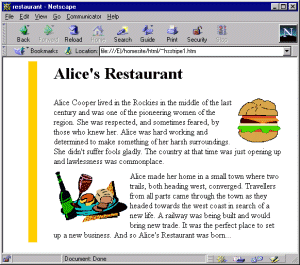
You should have something like this:
There are a few points to note about the code that we've used...
The table has three rows and four columns. The left hand column is empty. The second column is empty as well but has its background colour set. The third column is simply to provide some space between the 'stripe' and the text which is in the last column.
Notice that the percentage widths should add up 100. Notice, also, that cells which are empty actually contain the curious code so why is it there? Well, this is because some browsers complain if there's absolutely nothing in a cell so, to cater for that, we're just putting the HTML code for a non-breaking space - this is invisible to the user and keeps the browsers happy. In fact, the non-breaking space has a number of uses which we shall return to later on.
OK, it's your turn again...
- experiment with different combinations for the column widths
- see the effects of resizing your browser window
- can you add some vertical space between, say, the two paragraphs? How about putting in another row which has 'empty' cells?