



Page Backgrounds
You'll probably have come across websites that have textured page backgrounds, or others that have some sort of wide band or stripe down the left hand side of the page. These are quite easy to do and can be effective if done with a bit of care.
The first type uses a tile, or smallish square or rectangular image to provide the basic pattern. The browser will then cheerfully use this pattern to 'tile' the window that you're using. The tile can be any shape and any pattern.....BUT you don't want it to be a large file size...AND good tile designs are such that the 'joins' are not obvious because the edges blend in with each other.
Some examples of textures are include with the course materials. Let's use one on Alice's cafe.htm page...
This is the tile we're going to use:

The code looks like this - you'll see that we've specified a background colour as well as the background tile which is called texture.jpg and, in keeping with what we said earlier, it is filed in the images subdirectory. We specify the background colour to cater for any older browsers which do not recognise the use of tiles - they will simply use the colour instead...
<HTML>
<HEAD>
<TITLE>textures</TITLE>
</HEAD>
<BODY BGCOLOR="#FFFF99">
<H1>Alice's Tasty Treats...</H1>
<DIV ALIGN="center">
<TABLE BORDER=1 BGCOLOR="#FFCC33" CELLPADDING=5 BACKGROUND="images/texture.jpg">
<TR>
<TD ALIGN="center" COLSPAN=2><B>Lunch Menu<B></TD>
</TR>
<TR>
<TD>Item</TD>
<TD>Price</TD>
</TR>
<TD>Grits on Toast</TD>
<TD>£2.95</TD>
</TR>
<TR>
<TD>Seaweed Soup</TD>
<TD>£1.50</TD>
</TR>
</TABLE>
</BODY>
</HTML>
...and it looks like this:
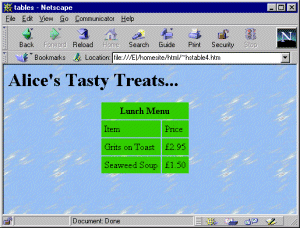
In this particular case it's pretty clear that these are, indeed, tiles and that may or may not be what you want. You should try some different textures and see which ones work well and which ones don't. If it's a darker background, you might need to change the colour of the text to make it stand out.
- try some different background textures and see how they work
There are a couple of approaches to use which produce stripes down the page...