



Spanning Rows and Columns
We've added a new row to the table definition...
- edit your file to this
<HTML>
<HEAD>
<TITLE>tables</TITLE>
</HEAD>
<BODY BGCOLOR="#FFFF99">
<H1>Alice's Tasty Treats...</H1>
<DIV ALIGN="center">
<TABLE BORDER=1 BGCOLOR="#FFCC33" CELLPADDING=5>
<TR>
<TD ALIGN="center" COLSPAN=2><B>Lunch Menu<B></TD>
</TR>
<TR>
<TD>Item</TD>
<TD>Price</TD>
</TR>
<TD>Grits on Toast</TD>
<TD>£2.95</TD>
</TR>
<TR>
<TD>Seaweed Soup</TD>
<TD>£1.50</TD>
</TR>
</TABLE>
</BODY>
</HTML>
- view the new page...
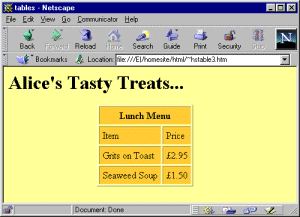
So the COLSPAN tag allows you to span two, or more, columns. Notice that it was not necessary to put in the second <TD>..</TD> tag pair for that row. There is a similar tag, ROWSPAN, which allows you to span a number of rows and it works in pretty much the same way.
You may not realise it, but many websites that you visit are using tables to control the layout. It may not be obvious because the BORDER attribute will be set to 0 and there may be columns of text in a single cell or a cell may contain a graphic. There's nothing wrong in doing this and, in fact, it's one of the few choices you have when it comes to controlling page layout. So use it, but be aware of the limitations and check your pages with as many different browsers as you can.
There are many other tags and attributes which you can use to control the appearance of your tables. Listing all of them is beyond the scope of this tutorial but you should have enough information now to get you started. Enjoy!